
Create stunning glassmorphism effects for free with our advanced online CSS generator. Make elegant, frosted glass interfaces that are perfect for modern web applications, dashboards, and mobile apps.
This is how your glass effect will look. The background can be an image or a solid color.
Adjust the controls to customize the effect to your liking.
Create stunning glassmorphism effects with our advanced CSS generator. This modern design trend combines transparency, blur effects, and subtle borders to create elegant, frosted glass interfaces that are perfect for modern web applications, dashboards, and mobile apps.
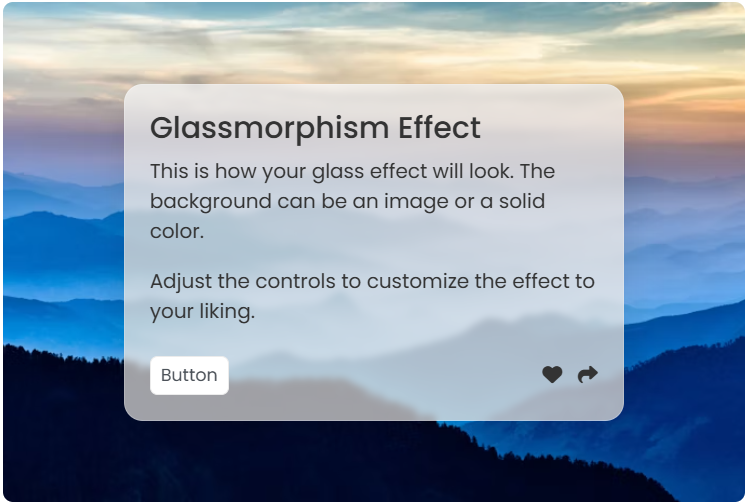
Glassmorphism is a contemporary UI design trend that mimics the appearance of frosted glass. It creates a translucent, blurred background effect that allows content to shine through while maintaining readability. This design approach has become increasingly popular in modern web design, particularly for creating depth and visual hierarchy in user interfaces.
Create modern iOS-style interfaces with translucent navigation bars and floating action buttons.
Design elegant admin panels and data visualization interfaces with depth and sophistication.
Enhance product cards and modal overlays with premium glassmorphism styling.
Select between an image background or solid color. Image backgrounds work best for creating depth, while solid colors provide a clean, minimal look.
Fine-tune the blur, opacity, and saturation values to achieve the perfect glass effect. Start with moderate values and adjust based on your design needs.
Set border radius for rounded corners and adjust border width for subtle definition. These properties help define the glass element boundaries.
Use the generated CSS code in your projects. The code is optimized, cross-browser compatible, and ready for production use.
| Property | Purpose | Recommended Range |
|---|---|---|
backdrop-filter: blur() |
Creates the frosted glass effect | 5px - 20px |
background-color: rgba() |
Sets transparency and color | rgba(255,255,255,0.1) - rgba(255,255,255,0.3) |
border-radius |
Rounds the corners | 8px - 20px |
border |
Adds subtle definition | 1px solid rgba(255,255,255,0.2) |
Our glassmorphism generator creates CSS that works across all modern browsers. The backdrop-filter property is supported in Chrome 76+, Firefox 103+, Safari 9+, and Edge 79+. For older browsers, we provide fallback styles that maintain visual appeal while ensuring functionality.
See your glassmorphism effect in real-time as you adjust parameters
Get optimized, production-ready CSS code that follows best practices
All generated effects are mobile-friendly and work across all screen sizes
Fine-tune every aspect of your glassmorphism effect to match your design vision
For the best glassmorphism effects, use high-quality background images with good contrast. Dark or colorful backgrounds work particularly well, as they make the glass effect more visible and impactful. Consider using subtle animations to enhance the user experience.
Ready to create stunning glassmorphism effects? Use our generator above to experiment with different settings and find the perfect combination for your project. Whether you're building a modern web application, mobile app, or dashboard, our glassmorphism CSS generator will help you achieve the perfect frosted glass aesthetic that users love.
Got questions? We've got answers. Find helpful information about our Glassmorphism Generator and how to use it effectively.